
Client Background
- Client: A leading retail firm in Australia
- Industry Type: Retail
- Products & Services: Retail stores
- Organization Size: 2000+
The Problem
We have developed a tool capable of extracting Purchase Orders consistently formatted in a specific manner. Upon extraction, the tool organizes the information in a predefined order and includes specific details. You can refer to the provided PDF for a sample Purchase Order and the accompanying spreadsheet showcasing the desired output format.
Following the successful extraction of each format of PDF, we integrated the functions to create a unified function for generating Excel or CSV files. Our next objective involves transferring this extracted data from Excel to an Airtable database.
Our Solution
Libraries Used: To accomplish the task efficiently, we’ve leveraged two Python libraries: Camelot and tabula. Camelot serves as our primary choice due to its exceptional accuracy in PDF parsing and table extraction. It’s adept at handling standardized formats consistently. Tabula, on the other hand, functions as a backup solution, offering flexibility to handle diverse PDF formats that Camelot may encounter challenges with.
Data Cleaning: Data cleaning procedures have been implemented to address any inconsistencies or errors present in the extracted tables. This includes resolving issues such as merged cells, multi-row headers, or special characters, ensuring the extracted data is uniform and reliable.
Preprocessing: During the processing stage, Camelot is utilized for the main table extraction process, with specific configurations set to accommodate various cases. Tabula supplements Camelot by stepping in to address any challenges or anomalies encountered during the extraction process.
Excel Output: The cleaned tabular data is then written to a CSV or Excel format file, ensuring easy accessibility and compatibility with other systems.
Methods: All the individual format functions for data extraction have been consolidated into a single function, streamlining the extraction process and enhancing code efficiency.
Air Table: Upon extraction, the extracted data is pushed to an Airtable database, facilitating seamless data management and access.
Google Cloud: For automation and scalability, the entire code base is deployed on a virtual machine (VM) on the Google Cloud Platform. This enables automated execution of the extraction process and ensures reliability and consistency. Additionally, Google Cloud Storage is utilized as a cloud storage solution for storing PDF files, providing a secure and scalable storage environment for the PDF documents.
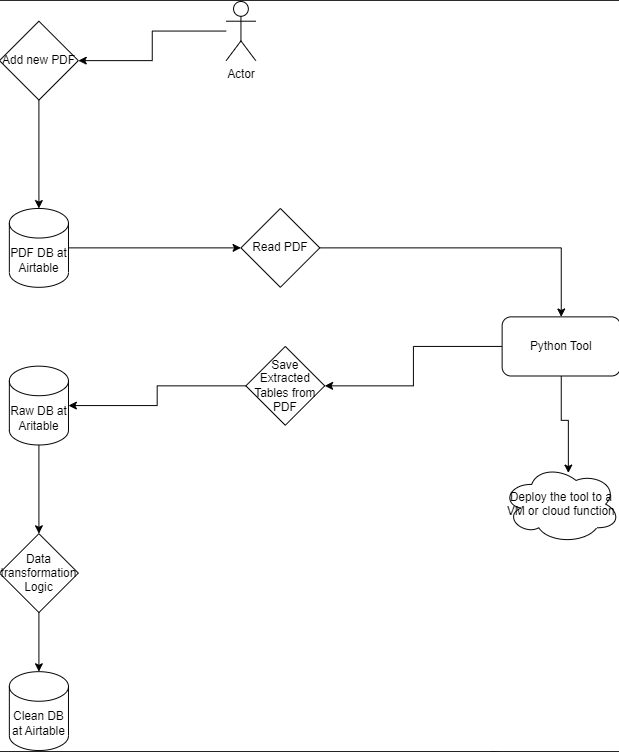
Solution Architecture
Deliverables
a) Updated a folder for all input PDFs.
b) Uploaded relevant PDFs for extraction of the table.
c) Extracted and saved the output file to the desired location in Excel/CSV format.
d) Air Table account for c” checking the updated data.
e) Automated the Python tool with Google Cloud, available for use.
Tools used
a) Camelot: Camelot is a reliable and precise Python library designed for extracting tabular data from PDF documents. It provides robust capabilities for accurately parsing tables, making it a preferred choice for tasks requiring high accuracy in data extraction.
b)Tabula: Tabula is another powerful tool used for extracting data from PDF files. It offers comprehensive features for extracting tabular data, particularly useful for handling diverse PDF formats and challenging extraction scenarios.
c) Google Colab and VS Code: Google Colab is a cloud-based platform that allows users to write and execute Python code in a collaborative environment. It’s often used for Jupyter Notebook (.ipynb) files, enabling easy sharing and collaboration on data analysis and machine learning projects. VS Code, on the other hand, is a popular code editor that provides a rich set of features for writing, debugging, and deploying code in various programming languages, including Python. Both platforms serve as valuable tools for developing and managing Python scripts and projects.
d) Airtable: Airtable is a versatile platform that offers customizable databases with a wide range of templates tailored for different industries and use cases. It provides intuitive features for organizing, managing, and collaborating on structured data, making it a convenient choice for storing and managing extracted data from PDFs.
e) Google Cloud: Google Cloud Platform (GCP) offers a suite of cloud computing services, including storage, compute, and automation tools. It provides scalable solutions for deploying and managing applications, as well as storing and processing large volumes of data. Google Cloud is utilized for purposes such as automation of data extraction processes and storage of PDF files, offering reliability, scalability, and security for managing extracted data and resources.
Language/techniques used
- Used Python for data extraction and cleaning due wide range of available libraries
Model Used:
No specific models were used in this project.
Skills used
a) Data Cleaning: Skilled in refining extracted data to enhance its quality and reliability by addressing inconsistencies, errors, and anomalies through techniques like duplication, handling missing values, and standardizing formats.
b) Data Transformation: Proficient in transforming extracted data to meet specific requirements, including format conversion, restructuring, aggregation, and calculation, ensuring it’s suitable for analysis, reporting, or integration with other systems.
c)Cloud Deployment: Experienced in deploying code and resources to cloud environments for testing, automation, and storage functionalities, leveraging platforms like Google Cloud Platform (GCP) or AWS for scalability, flexibility, and accessibility from anywhere with an internet connection.
Databases used
AirTable
As a Storage GCP Bucket
Web Cloud Servers used
Google Cloud.
What are the technical Challenges Faced during Project Execution
a) Data Extraction: Extracting data accurately from unclear or poorly formatted sources presented challenges, requiring careful consideration and possibly the use of specialized techniques or libraries to improve extraction accuracy.
b) Mapping Columns and Rows: Ensuring correct mapping of columns and rows according to the original table structure posed challenges, necessitating meticulous validation and adjustment to align the extracted data properly.
c) Handling Missing Data: Dealing with missing data, such as empty columns or null values in the extracted file, required strategies for handling these instances, such as imputation, removal, or interpolation, to maintain data integrity.
d) Airtable Integration: Automatically parsing data to the required data type for pushing it to Airtable presented difficulties, as it required careful conversion and validation to ensure compatibility with Airtable’s data model and schema.
e) Code Deployment: Deploying the code was challenging due to dependencies or compatibility issues, necessitating thorough testing, version control, and potentially the use of containerization or virtualization techniques to ensure smooth deployment across different environments.
How the Technical Challenges were Solved
a) Data Mapping: Extensive analysis and mapping were conducted to ensure consistency and accuracy in the extracted data. This involved studying the data structure and applying necessary transformations to align it with the desired format or schema.
b) Data Cleaning and Transformation: Utilizing techniques such as forward fill (ffill) and backward fill (bfill) helped address missing values, ensuring completeness and coherence in the dataset. These methods contribute to enhancing data quality and facilitating subsequent analysis or processing steps.
c) Type Conversion: Employing type conversion techniques enabled the conversion of data into the required data types, ensuring compatibility with downstream systems or applications. This step ensures that the data is appropriately formatted for its intended use, enhancing usability and effectiveness.
GitHub repository – https://github.com/AjayBidyarthy/Todd-Stupell