
- Objective:
Project using n8n integrated with Supabase that enables users to perform
question-answering operations on Google Documents.
- It reads the data from a specified document file in Google Drive or whenever the document is edited.
- It processes the document content and converts it into vector embeddings.
- These vector embeddings are then stored in a Supabase database.
- When users ask questions through the n8n interface, the system retrieves relevant data from Supabase and utilizes an LLM model to generate accurate responses.
- Workflow:
- Data Storing Workflow
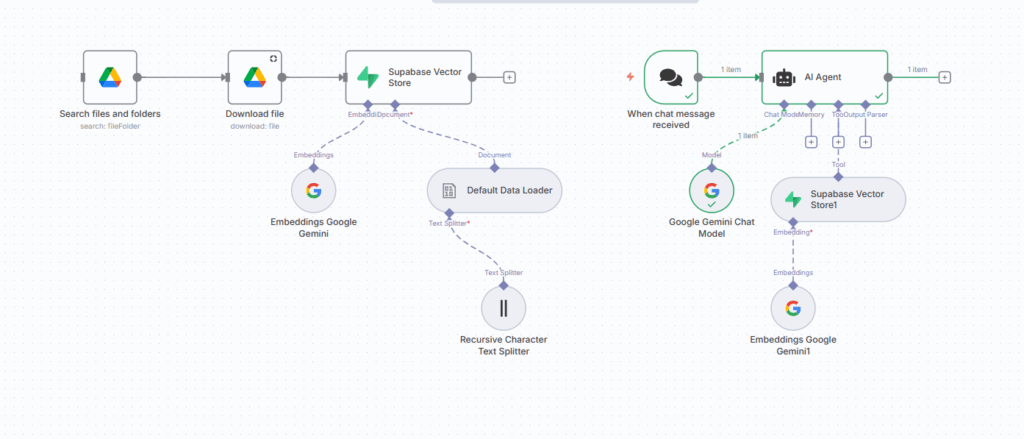
Step 1: Used Google Drive node – Select file from Google Drive
Step 2: Used Google Drive node – Download the file in Binary form
Step 3: Store this data in Supabase vector store
- Used Default Data Loader node – It loads the binary data by splitting text
- Used Recursive Character Text Splitter node – It splits the large text into smaller, manageable chunks by preserving the semantic meaning.
- Used Embeddings Google Gemini node – It creates the embedding vectors for the chunks.
- Q/A interaction with LLM by users Workflow
Step 1: Used chat trigger node
Step 2: Connect with AI Agent
- Connect the AI Agent with Google Gemini Chat Model node – It takes prompt from the users.
- Connect the AI Agent with Tool Supabase Vector Store1 node – It retrieves the most relevant response from the database by creating the embeddings of user’s prompt.
- Connect Embeddings Google Gemini1 node – It generates vector embeddings for the user’s prompt and returns results by matching them with stored embeddings.