
Client Background
- Client Name: A leading IT consulting firm in the USA
- Industry Type: Technology
- Products & Services: ERP Software Solutions and Back Office Services
- Organization Size: 100+
The Problem
- The client had a large, complex ERP database.
- Business owners and leaders couldn’t directly explore or talk to their data.
- Insights were locked behind:
- Static reports
- Complex SQL queries
- Technical teams acting as intermediaries
The client wanted to make their ERP data truly accessible to business users, in a way that felt:
- Interactive – ask questions in plain English
- Self-service – no need to know SQL or table structures
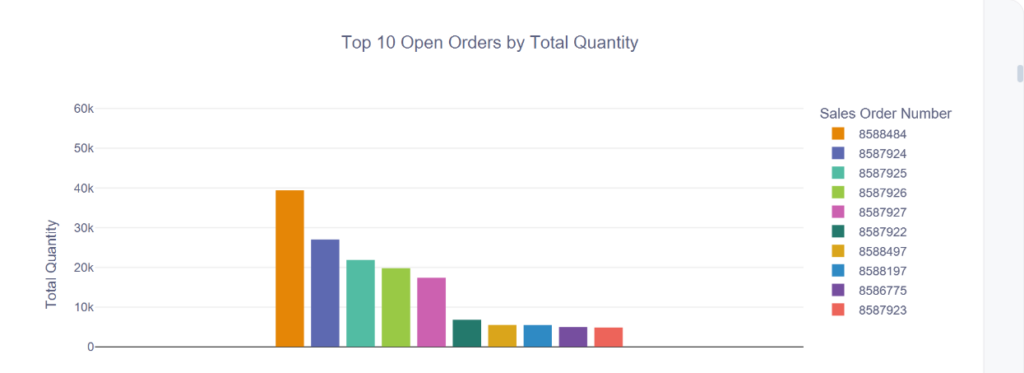
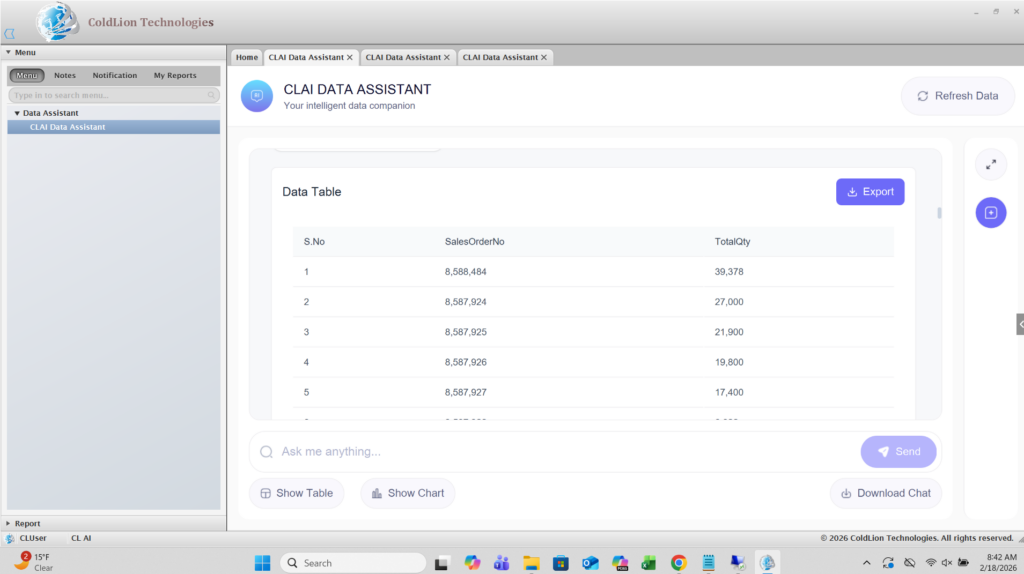
- Visual – be able to see tables/charts, not just raw numbers
A need to connect the business owners with their data was required where a chatbot that sits on top of their ERP database and lets business owners ask, explore, and visualize their data in a simple, natural way would be more flexible and easier.
Our Solution
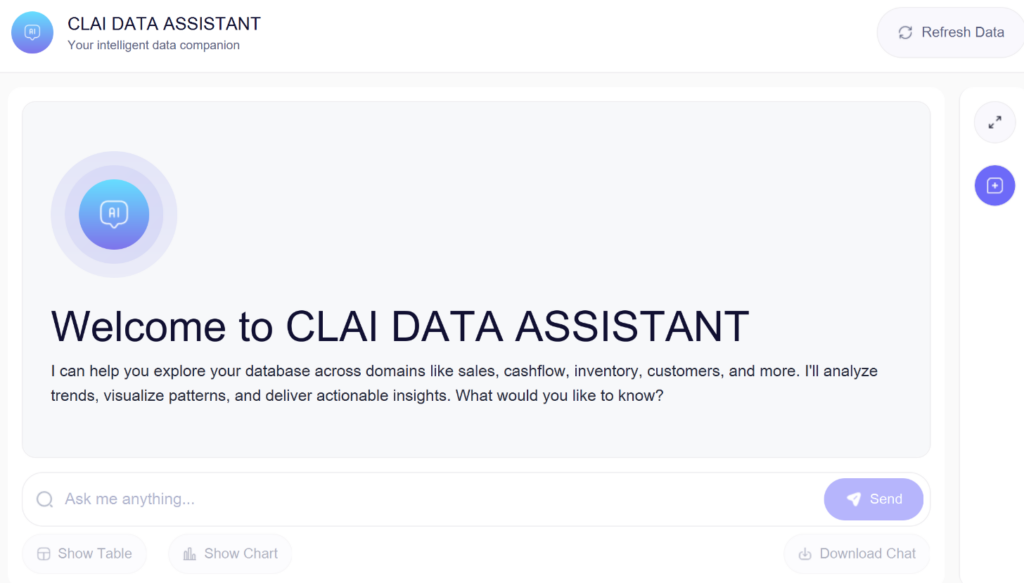
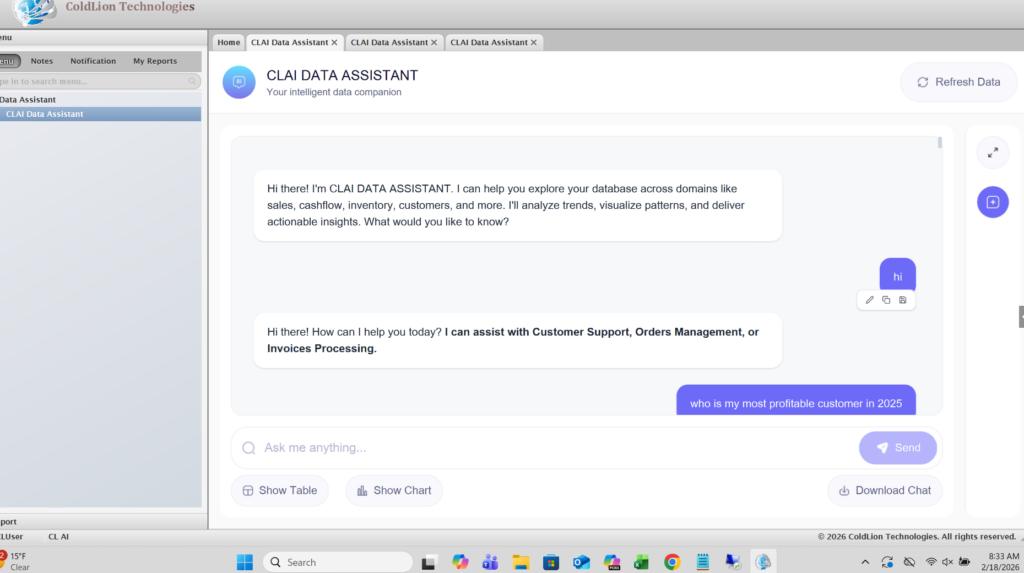
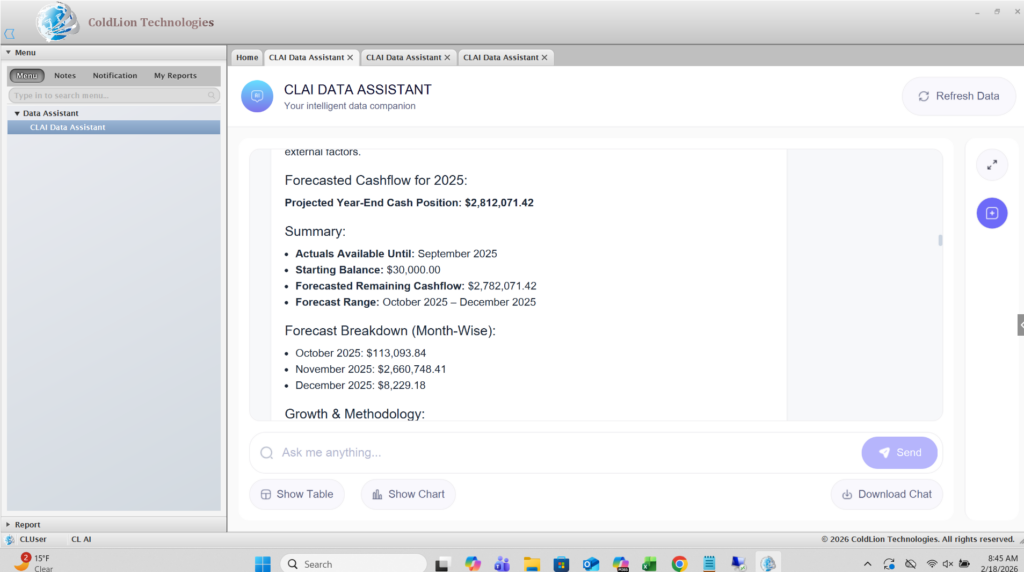
We built CLAI Data Assistant, a production-ready ERP SQL chatbot that sits between business users and the database.
Key capabilities:
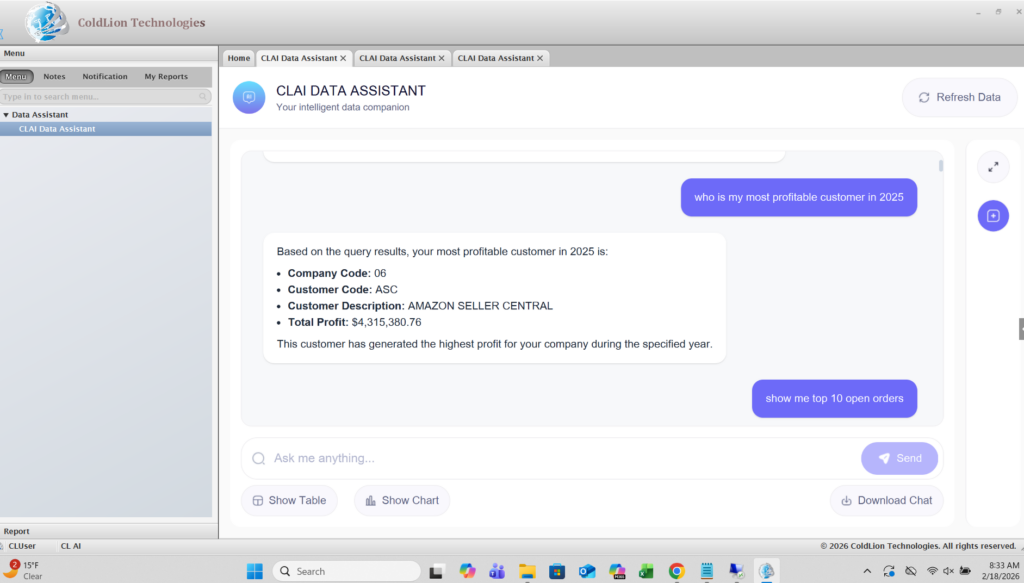
- Natural language to SQL
- Users type questions in normal English.
- The assistant converts them into validated SQL queries and runs them on the ERP MSSQL database.
- Smart intent detection & routing
- Distinguishes greetings, casual chat, vague questions, business questions, and forecasting questions.
- Routes each message to the right engine – SQL query engine or forecasting engine.
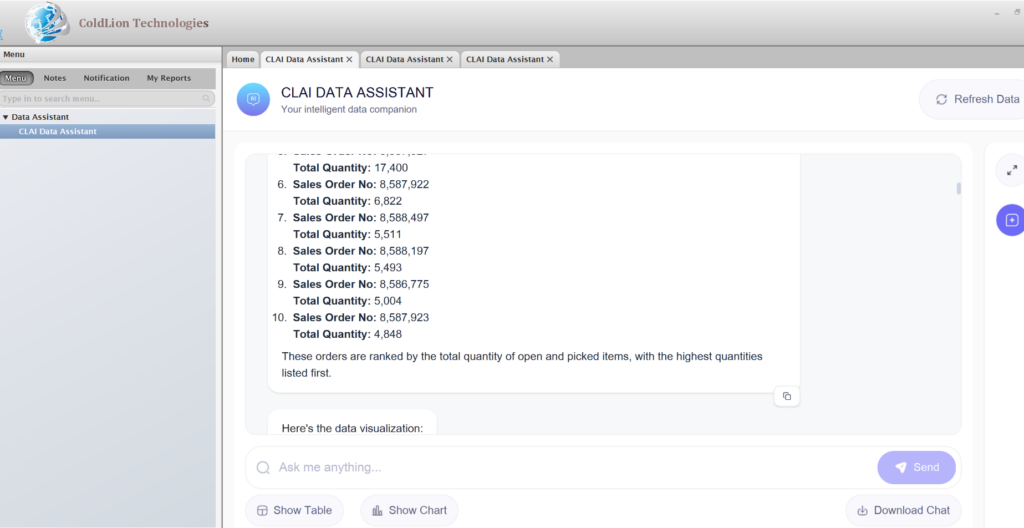
- Business-ready answers, not just raw tables
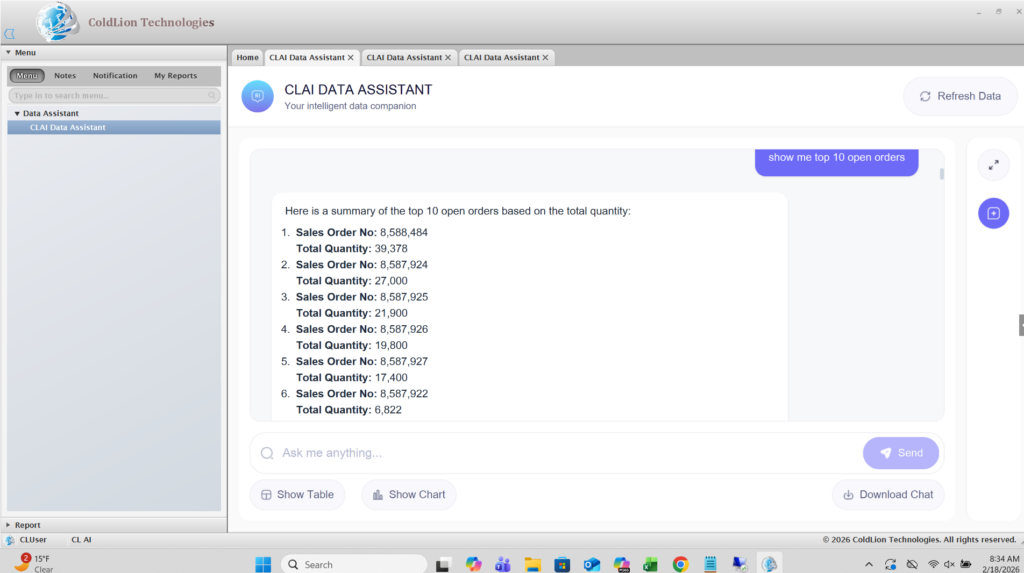
- Raw query results are summarized into concise business insights (top customers, trends, balances, etc.).
- Large result sets are handled safely and summarized instead of dumping thousands of rows.
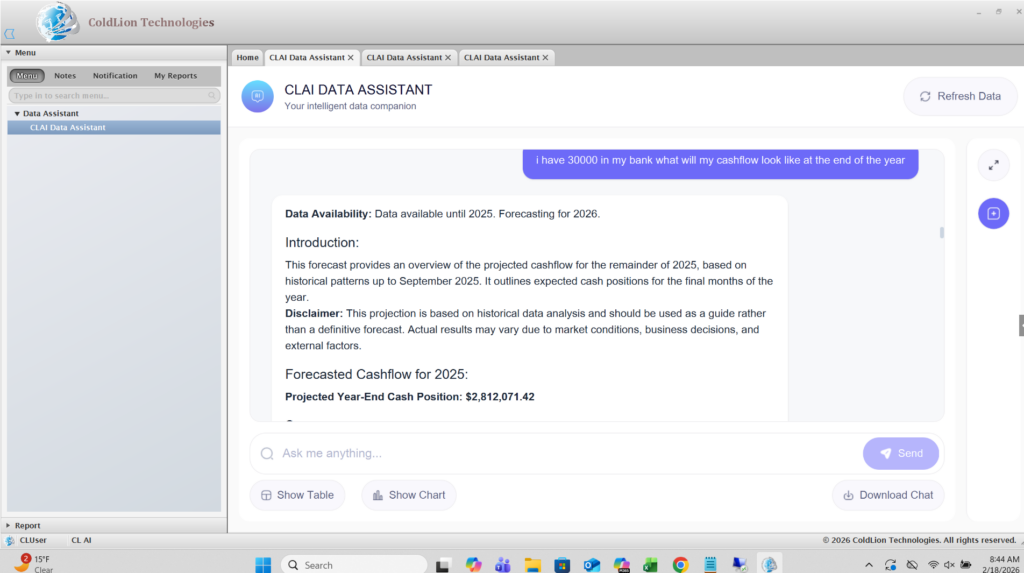
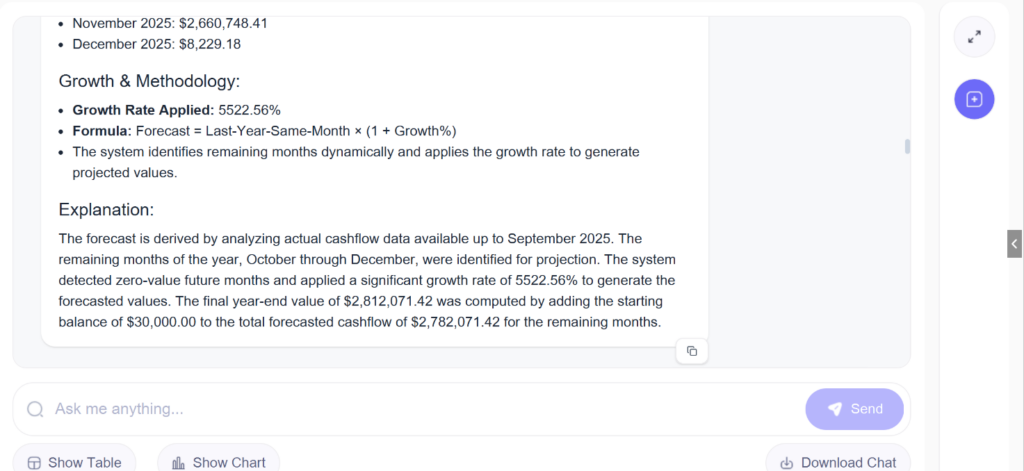
- Forecasting engine for “next year” questions
- For questions like “What will my revenue be next year?” the system pulls multi-year history, structures it, and passes it to a prediction engine to produce sensible future estimates.
- For questions like “What will my revenue be next year?” the system pulls multi-year history, structures it, and passes it to a prediction engine to produce sensible future estimates.
- Streamed, chat-style UX
- Answers appear in a modern chat interface with streaming responses, making the assistant feel responsive and interactive.
- The end result is a single chat interface where business owners can explore their ERP data in real-time without touching SQL or navigating complex menus.
Solution Architecture
Interface & Access Layer
User Interaction Layer
- Entry point for all user queries.
- Accepts natural language inputs for historical analysis, forecasting, or general questions.
API Gateway
- Central access point to the analytics system.
- Handles request routing, authentication, and initial request validation.
- Ensures all traffic flows through a controlled interface before reaching core services.
Session & Governance Layer
Session Initialization
- Establishes conversation context.
- Maintains session-level state for continuity across interactions.
Token Budget Management
- Monitors and controls token usage per request.
- Ensures system efficiency and prevents excessive computational cost.
Intent Classification Engine
- Core decision-making component.
- Classifies incoming queries into:
- Historical Data Query
- Forecast Query
- General Query
- Routes the request to the appropriate processing pipeline.
Data & Intelligence Processing Layer
This is the analytical core of the system.
A. Historical Query Pipeline
SQL Query Generation
- Converts natural language questions into structured SQL queries.
Query Validation
- Validates syntax, schema compatibility, and query safety before execution.
Database Interaction
- Executes validated queries on the database.
Result Processing
- Cleans, structures, and prepares raw query results.
Insight Generation
- Produces contextual business insights from retrieved data.
B. Forecast Query Pipeline
Latest Data Detection
- Identifies the most recent available dataset required for forecasting.
Data Aggregation
- Aggregates and prepares historical data for model consumption.
Forecast Computation
- Applies forecasting logic or models to generate predictions.
Predictive Insight Generation
- Converts forecast outputs into business-readable insights.
C. General Query Pipeline
Direct AI Response
- For non-analytical or informational queries.
- Generates a direct AI-driven response without database interaction.
Presentation & Response Layer
Visualization & Formatting
- Consolidates outputs from all pipelines.
- Formats responses into:
- Structured text
- Tables
- Charts (if applicable)
- Ensures consistency in output presentation regardless of pipeline.
Streaming Response to User
- Streams responses incrementally back to the user.
- Improves perceived performance and user experience.
Deliverables
- Updated SSL Certifications
Renewed and configured SSL certificates to ensure secure communication and uninterrupted service availability. - Implemented Token Usage Monitoring & Cost Estimation
Developed a function to:- Track tokens used per question per day
- Calculate total tokens consumed
- Estimate cost per request for better monitoring and cost control
- Enhanced Prediction Stability & Token Management
Added a keep-alive counter to prevent grouped prediction failures and implemented a token limiter function to avoid exceeding token limits. - Enhanced Question Logging & Storage Mechanism
- Updated the API to store user questions in the database
- Modified logging to maintain only one log entry per question
- Ensured each user can view only the questions they have personally saved
- Integrated Client Credential Fetching API
- Created a new API to fetch database credentials and user ID from the client’s API
- Modified the system to automatically store fetched DB credentials securely in the environment configuration
- Implemented Session-Based Architecture for Chatbot
- Added session_id support
- Created a centralized session manager
- Removed global mutable state and migrated to session-scoped storage
- Scoped database access per session with secure credential handling
- Integrated OpenAI thread management
- Completed testing and validation of session-based implementation
- Refinement & Code Optimization Improvements
- Implemented TOON techniques in prediction_engine.py to reduce token consumption and optimize API usage
- Modified conversational responses to display only required disclaimer messages
- Added safety layer to prevent users from directly submitting SQL queries
- Updated APIs to pass user_id instead of session_id
- Made external API link dynamic for future database integrations
- Tested and validated multi-database routing with new database
- Implemented dynamic current-year detection based on latest available data and added forecast disclaimer messaging
- Improved entity-summary mapping by associating each entity exclusively with its own summary
- Configured Auto-Restart for Backend & Frontend Services
Setting up PM2 to ensure uptime and system stability, particularly in cases of unexpected terminal closures. - Testing & Validation of ColdLion Application
Conducted complete testing and validation to ensure overall system stability, correctness, and readiness for deployment.
Tech Stack
- Framework used
- FastAPI (backend API framework)
- LangChain (SQL agent orchestration)
- OpenAI Assistants API (tool calling & routing)
- Uvicorn (ASGI server)
- Language/techniques used
- Python (backend, orchestration logic)
- JavaScript / React / Next.js (frontend)
- Tailwind CSS (UI styling)
- REST APIs & JSON
- Models used
- OpenAI GPT-4o (core reasoning, SQL generation, summaries)
- OpenAI GPT-4o-mini (fast intent classification & keyword matching to improve latency)
- Skills used
- Solution & data architecture for ERP systems
- Secure database integration (read-only MSSQL access)
- LLM prompt design and tool-calling workflows
- SQL optimization and validation
- Error handling, retries, and latency optimization
- Frontend UX for chat-based analytics tools
- Databases used
- Microsoft SQL Server (ERP transactional database – Sales, AR, AP, Orders, Items, Inventory, Amazon tables)
- Web Cloud Servers used
- AWS Windows Server
- Application accessed via RDP and browser using internal IP / future subdomain
What are the technical Challenges Faced during Project Execution
- Converting free-form English into safe SQL
- Users phrase questions in many different ways, including typos and partial context.
- Needed to ensure the LLM does not generate unsafe or heavy queries.
- Choosing the right tables automatically
- The ERP database has many tables, including logs and system tables.
- Mapping user intent (“open AR”, “top customers”, “Amazon shipments”) to the correct subset of tables was non-trivial.
- Distinguishing between historical vs forecast questions
- Handling vague or conversational queries gracefully
- Users sometimes type “show me something” or ask general knowledge questions.
- The system needed to respond helpfully.
- Latency & user experience
- Calling LLMs, generating SQL, executing it on MSSQL, and then summarizing – all within a reasonable response time..
How the Technical Challenges were Solved
- Strict intent classification & routing layer
- Implemented a dedicated intent classifier (greeting / conversational / vague / business / forecast).
- Only business/forecast messages reach the SQL or prediction engine, reducing mistakes and load.
- Implemented a dedicated intent classifier (greeting / conversational / vague / business / forecast).
- AI-assisted keyword → table mapping + schema cache
- Built a schema cache that scans all tables and filters out logs/system tables.
- Combined an AI keyword matcher with a curated mapping (e.g., “AR”, “aging”, “open AR” → ARDocument, ARBatchDetail, Customer).
- This ensured the LLM only sees relevant tables for each question.
- Dedicated prediction tool for future questions
- Registered a separate run_prediction_tool in the Assistant, with clear routing rules for future-looking questions (forecast, predict, next year, 2026+).
- This cleanly separated “read existing data” vs “forecast future data”.
- Safe SQL validation and retry logic
- Every generated SQL query is passed through a validation layer that blocks non-SELECT statements.
- If a query fails due to missing columns/tables, the system can rebuild schema cache and retry.
- Handling vague & conversational inputs
- For vague business queries (“show me data”), the assistant replies with a clarification prompt offering options (Customers, Sales, AR, etc.).
- For general knowledge questions, it answers briefly and reminds the user that its main role is to assist with their business data.
- Latency optimization
- Used GPT-4o-mini for lightweight tasks like intent classification and keyword matching.
- Cached schema and minimized context to reduce token size.
- Implemented streaming responses so users see answers as they are generated.
Business Impact
The assistant delivers clear value:
- Easier Access to the users data which helps in Faster decision-making.
- Reduced dependency on SQL skills
- Lower risk of unsafe database access
- All queries are read-only and automatically validated.
- No direct SQL access is given to end users.
- Scalable foundation for future features
- The architecture is flexible enough to add:
- Rich visual dashboards
- More forecasting models
- Multi-tenant support
- Additional databases or modules
- The architecture is flexible enough to add:
Project Snapshots